


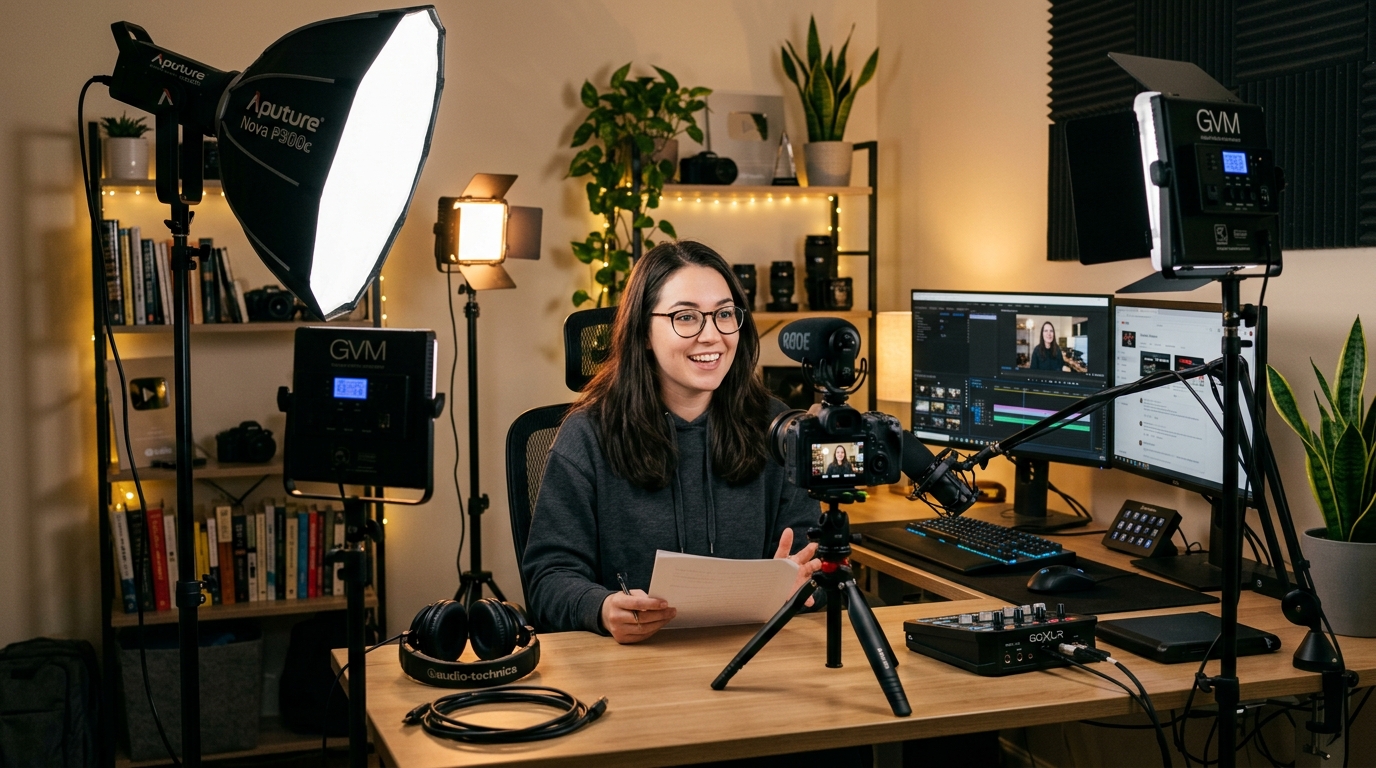
Lighting is really what distinguishes a professional-looking video from a home video, even more than the camera upgrade any creator can make. A camera with decent features and good lighting can outperform a top-tier camera with poor lighting almost always, which is why professional videographers invest money in lights and don’t even think twice about it.
Creators working from home often get caught up in the idea that this means they have to purchase studio gear. The truth is, it doesn’t. Typically, the difference between a video that “looks like it was professionally shot” and one that “looks like it was shot at someone’s kitchen table” comes down to just three lights correctly set up, and the gear for that is less expensive than a single good lens.
Here is the no-nonsense guide to lighting a home content setup without turning it into a studio, along with the common mistakes in home creator footage and the gear that really makes a difference.
The Three-Point Setup Is Still the Foundation
Before making any purchase, it’s best to know what kind of setup or environment you want to create. The traditional three-point lighting method actually relies on a key light, a fill light, and a back light. In fact, it’s the basis for virtually every professional video that you have seen. Once you get the reason, it will be easy for you to modify it to your own space.
The key light is the primary light, it should be approximately at 45 degrees to the subject’s face and a bit higher than the eyes level. This way, you will get the nicely defined and attractive shadows that give the faces a three-dimensional look rather than a flat one. Most home creators are simply missing the key light which makes their video look dark and dull even though they can still see themselves clearly.
Panel Lights and the Case for LEDs
Physical equipment has been continuously upgraded and its price lowered to an unbelievable level over the past few years. LED panel lights with prices from $80 to $200 nowadays produce the quality that used to be possible only at fixtures with a price tag of four times more, and they accomplish this without heat, bulbs that burn out, or power consumption of the older lighting.
The specs that count are color rendering index (CRI) and color temperature range. A CRI of more than 95 means that skin tones look natural rather than slightly off, which is something that viewers notice subconsciously, even when they cannot explain it. Bi-color panels that change from 2700K warm to 6500K cool give you the ability to match the light in your room, which is important when sunlight is entering through windows or there are other light sources in the frame.
Softboxes, Diffusion, and Why Harsh Light Ruins Everything
The most frequent error that people who make videos at home commit with lighting is using lights that are way too hard. An uncovered bulb or a little LED panel causes very harsh shadows, especially under the nose, the eye sockets getting really dark, and the texture of the skin being highlighted in a way that no one wants. Illuminating the subject with a softer light is the solution to these problems, and it is almost always a good return on the small amount of money spent.
A softbox is simply a fabric box that light passes through and is spread over a larger area, which is the trick that makes light look soft. The larger the softbox in comparison to the subject, the softer the light. A 24 x 24-inch softbox combined with a good quality LED is the perfect size for home content creators, large enough to be flattering, yet small enough to fit in a typical home office.
Another cheaper option is using umbrella reflectors, which are quite effective. A white shoot-through umbrella costs about $20 and works as a diffuser almost as well as a softbox, but it also throws light in all directions, which can be an issue in small rooms where you don’t want to illuminate the walls behind the camera. If the room is bigger, no problem.
Background Lighting and the Depth That Viewers Notice
The main difference between dull content and videos with a three-dimensional look is usually the background of the shot. A person’s face that is perfectly lit against a dark and unlit wall looks very unprofessional, and the solution is to add some light to the background so that it is not simply a black void.
Using practical lights in the background such as lamps, LED strips behind shelves, or small accent fixtures – quickly add visual interest and render the scene with depth without the need for dedicated lighting gear. A variety of subtle light and color changes behind a person is the objective here, not a full-blown stage set, and even a single warm-colored lamp in the corner of the shot totally alters the vibe of the shot.
In this category, smart LED strips are by far the most versatile single tool. When placed behind the desk, on the back of a monitor or along a bookshelf, these strips provide color accents that correspond to your brand or mood without the need to add any fixtures to the shot. A lot of creators pick them up from specialty retailers like the Pandaloo online store when they want something more polished than the generic strips sold at big-box electronics stores. Those that are app-controlled allow you to select the exact colors and intensities, and that is important when you want to have a consistent look for different recording sessions.
Color Temperature, Consistency, and Avoiding the Mixed Light Trap
One major and often unseen cause of color problems in home videos is mixing different color temperatures. For example, sunlight has a color temperature of about 5500K to 6500K, while indoor warm bulbs are typically around 2700K to 3000K, and cheap LEDs can be almost any temperature, depending on the manufacturer. When these sources get mixed up in the same scenario, the results is usually a color cast that is difficult to fix during post-production and also looks strange to the eyes of the viewers.
The easiest remedy is to pick a color temperature for your setup and make sure everything matches it. If you are shooting during the day with window light, your key and fill should be daylight temperature (about 5600K). If you are filming during the evening with ambient room lighting, your whole lighting should be at a tungsten temperature (about 3200K), and any daylight-balanced sources should be switched off. What really counts is consistency rather than the choice of color temperature.
Getting It Dialed In
Setting up a good home lighting system properly probably won’t take more than an afternoon and will start to repay you every time you record a video, after that. A soft key light at just the right angle, complemented by a slightly less intense fill light, a back light for creating separation, and a carefully arranged background lighting, will cover most of the creator’s needs and result in footage that looks truly professional, not just acceptable.
Those creators who make this investment early on usually experience audience growth as production quality has a direct impact on how videos perform on algorithmic platforms and how long viewers remain. The camera may be what initially draws attention, but lighting is the one that does most of the work, and the difference between creators who get this and those who don’t is evident in every single frame.