


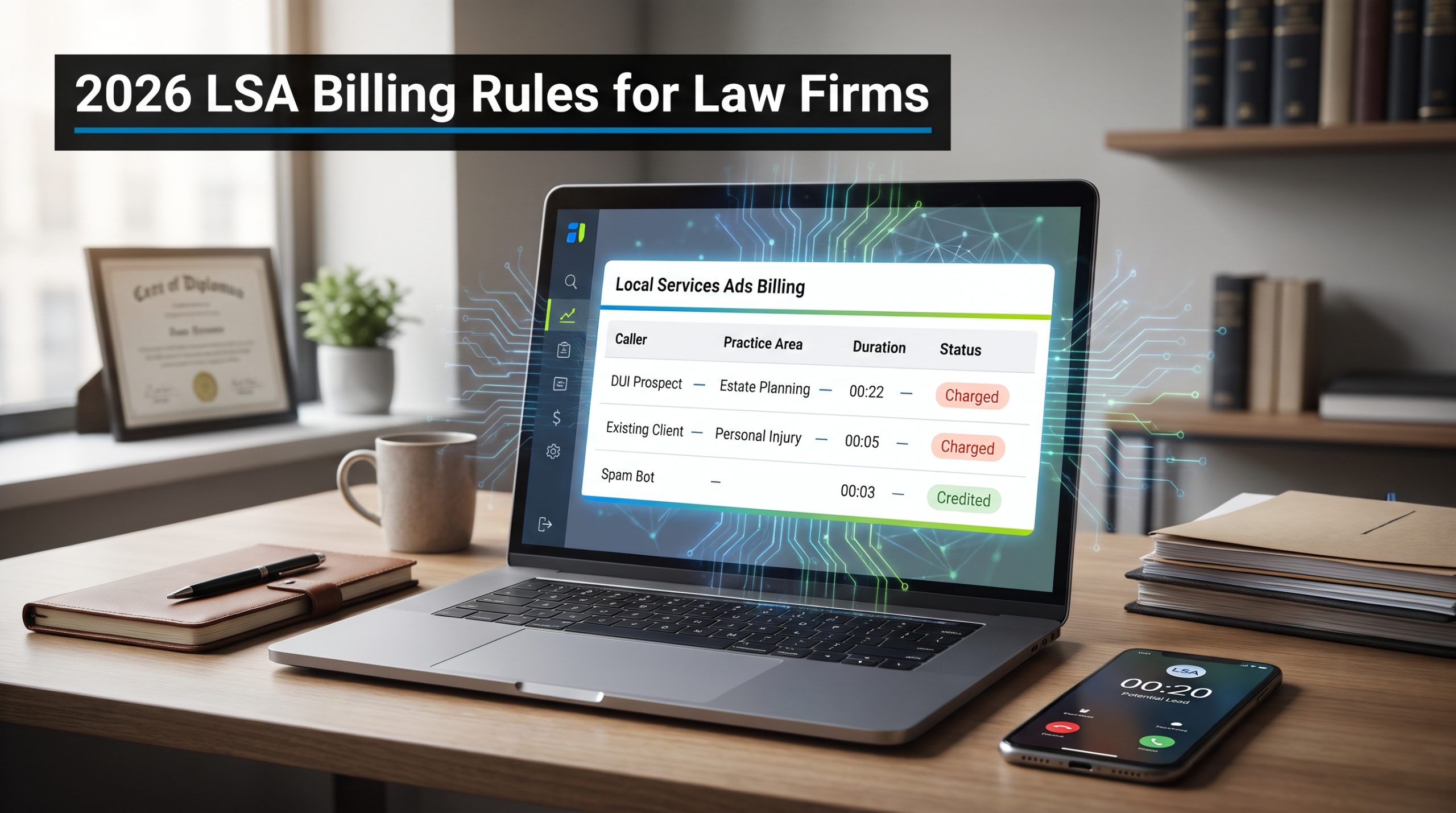
The phone rings: you expect a new client. Instead, a roofing salesman launches into his pitch, yet Google still flags the 22-second call as a paid Local Services Ads (LSA) lead.
Since October 1, 2026, even a missed business-hours call can trigger a fee once the caller stays on the line for more than 20 seconds, and an algorithm, not a human, decides whether you ever get that money back.
In the pages ahead, we’ll show why mismatched calls still count as “valid,” how automatic credits really work, and the simple steps you can take today to protect your marketing budget.
The short answer: what changed
Google replaced manual disputes with automated lead review
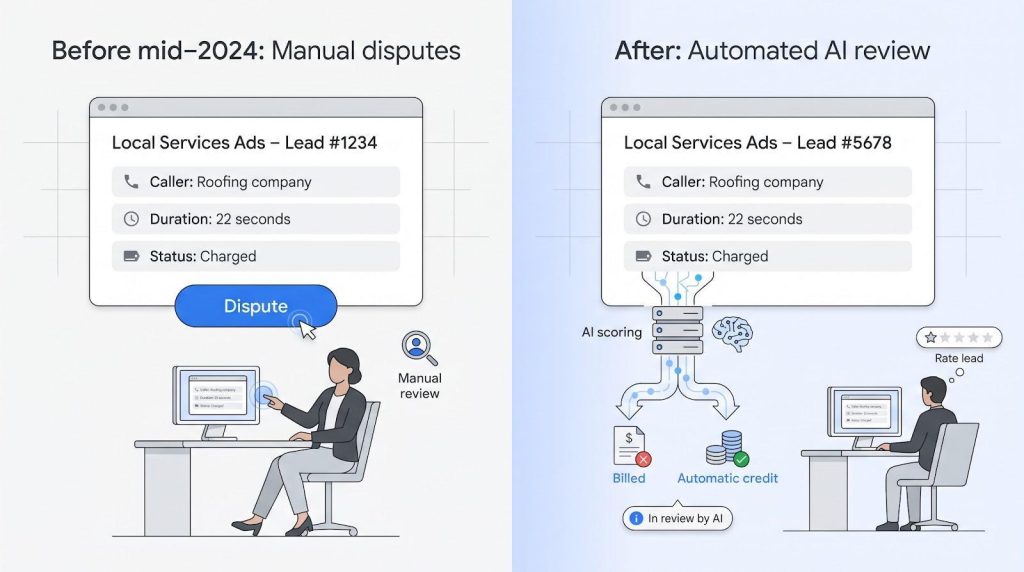
Until mid-2024 you could click Dispute, add a note, and wait for a human to issue a refund. That button’s gone. Every call, message, or booking now passes through Google’s machine-learning filter. The system bills anything it labels “valid,” then re-checks the charge for up to 30 days. During that window you can rate the lead, but your feedback only trains the model: it doesn’t reopen a case or guarantee a credit. According to the Google Help Center, this is the current policy.
Missed calls can now cost money
As of October 1, 2026, Google bills a missed business-hours call once the caller stays on the line for more than 20 seconds. A voicemail greeting won’t stop the clock, and the platform measures ring time, not helpfulness. According to Google policy, your posted hours and call-routing map become cost controls. List Open 24 hours but shut down at 6 p.m., and every 20-second after-hours ring becomes a paid lead the AI may refuse to credit. Tighten ad schedules, test overflow routing, and keep a live human on the line.
Some bad leads won’t earn a refund: by design
Wrong practice, wrong geography, and existing-client calls usually stick. Leave general lawyer checked, and a custody caller can still appear under your PI ad. Choose an entire county, and a tenant 90 miles from court still qualifies. Even a former DUI client asking for a new date can trigger a new fee, unless the number duplicates a call placed within 15 days.
Bottom line: when a call reaches you because of your own category, area, or schedule settings, Google treats it as a promised lead. Tight targeting beats post-charge frustration every time.
How LSAs work for lawyers in 2026
Placement and payment model
Local Services Ads sit above standard pay-per-click results, marked by a small green check and the label Google Verified. Your firm name, star rating, and phone icon appear, with no custom headline and no landing page. When someone taps Call or Message, Google routes the interaction through a proxy number and decides whether it becomes a paid lead. A missed business-hours call that lasts more than 20 seconds triggers a fee, and an answered call is judged on the conversation itself, not on a timer.
That simplicity frees you from keyword lists, but it also removes control: no negative keywords, no A/B ad copy, and no long-tail queries.
Google verified and lawyer eligibility
Before an ad can run, every listed attorney must pass Google bar-license and background checks. Once cleared, the firm earns the Google Verified badge (formerly Google Screened). Lawyers choose from Google’s legal categories (bankruptcy, criminal defense, personal injury, and more); pick only the ones you truly handle. Google removed featured professionals and made headshots optional in October 2026, so profile completeness, service areas, and your review average matter more than photos.
What moves your ad to the top
Ranking blends money and trust.
- Average review score and volume
- How quickly you answer calls or messages
- Whether your ad is active during the searcher’s local business hours
- Profile completeness and proximity to the searcher
Miss several calls in a row, and your responsiveness score drops, pushing a rival firm higher. Keep a five-star average and pick up promptly, and you can outrank a higher bidder.
What counts as a charged lead in 2026
Answered phone calls
When someone at your firm answers, ring time stops mattering: Google evaluates it as an answered call based on the conversation, and a poor-quality, duplicate, or invalid call can still be credited later. Triage fast and end the call politely if it is not a fit.
Missed calls that last 20 seconds
If no one picks up within 20 seconds, Google treats voicemail as the answer and posts a fee. An open 24 hours listing without overnight staff becomes expensive quickly.
Voicemail or automated greeting
Voicemail does not pause the timer. If total time on the line (ringing plus your greeting) exceeds 20 seconds, the lead bills even if the caller leaves no message. Keep prompts brief, and route to a live person as soon as possible to avoid paying for silence.
IVR or phone-menu calls
For phone systems that ask callers to press a key, the 20-second timer will not begin until the caller presses that key. A caller who hangs up beforehand is free, but stretching menus to game the rule annoys real prospects.
Messages, emails, and bookings
Form fills and booking requests skip the 20-second buffer; they post as paid leads as soon as they appear in your dashboard. If a custody inquiry reaches your immigration practice, Google still calls it valid because category settings control eligibility.
Repeat callers
A number or email that contacts you again within 15 days is usually free. Day 16 restarts the meter, so track multi-touch leads in your CRM to avoid counting cost per case twice.
Quick reference
| Contact type | When it bills | Built-in safeguard |
| Answered call | When answered, judged on the conversation | Fast triage |
| Missed call ≥ 20 s | After 20 s ring/voicemail | Accurate hours, fast pickup |
| Voicemail greeting | Counts toward 20 s timer | Fast pickup |
| IVR menu | 20 s timer starts after key press | Simple menu |
| Message / booking | On form arrival | Tight category settings |
| Repeat call within 15 d | Usually free | Track lead IDs |
Why a junk call may still be non-creditable
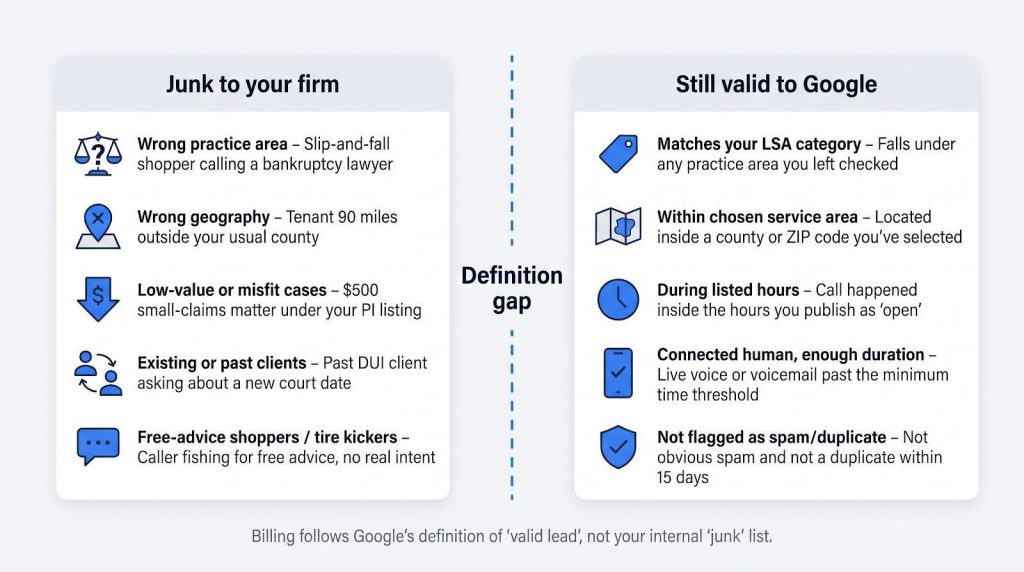
Google’s definition is narrower than yours
To most firms, a junk call is any inquiry they cannot accept, such as a slip-and-fall shopper reaching a bankruptcy lawyer, a tire kicker after free advice, or a past client dialing the firm’s direct line. Google’s rules focus on spam, bots, solicitation, and exact duplicates within 15 days; almost everything else is “potential business” you invited through chosen categories, service areas, and hours.
Understanding that gap is step one. Closing it starts with tighter settings and faster triage, not a support ticket.
Bad for business does not equal invalid lead
A caller seeking a $500 small-claims case under your “personal injury” listing, or a prospect who disappears after fee questions, still meets Google’s connected-human test. Even turning callers away because you are swamped will not trigger a credit. The algorithm charges for opportunity, not outcome, so qualify quickly and move on.
The practice-area mismatch
Select “personal injury, general” and Google may send anything from dog bites to fender benders. Leave “general lawyer” active and family-law questions can slip through. From Google’s viewpoint the call matched your settings, so no refund is due. Scrub broad categories, disable services you refer out, and review the list quarterly.
The existing-client gray area
Unless the same number reached you within the last 15 days, Google treats every connected call as new. A former DUI client asking about a court date looks identical to a fresh lead in the data. Route current matters to a separate phone line to keep repeat clients off the LSA meter.
When Google’s docs disagree with themselves
Google’s help pages do not always line up. A link titled “How to dispute charges” now opens the automated-credits page, and that page says Google no longer credits “job type not serviced” or “geo not serviced” leads. Trust the newest billing policy over old screenshots, and audit real credits in your own ledger: evidence beats outdated copy every time.
Inside the AI credit and billing flow
Step 1: Contact routes through Google
Every LSA phone number, form, and booking widget acts as a proxy. When someone reaches out, Google bridges the call, logs metadata, and, where bar rules permit, records audio. All of this happens before your phone even rings, so the billing journey starts the instant Google’s servers connect.
Step 2: Initial machine screening
An automated filter blocks obvious spam: one-second robocalls, known scam numbers, and bot messages. No fee posts for these contacts. Everything else, including wrong practice, wrong geography, or existing clients, continues because the system assumes your settings reflect intent.
Step 3: Lead status assigned
- Not charged: filtered at first contact as low quality, spam, or a duplicate, and listed as Not charged in your lead reports
- Charged: meets time, connection, and policy rules, fee posts immediately
- In review: the algorithm spots something odd (for example, a six-second voicemail) and holds billing until it decides
Not-charged leads still appear in your lead reports, so check that column before assuming every contact was billed.
Step 4: Ongoing review (up to 30 days)
For 30 days Google’s models keep reassessing the charged lead. A charge can flip to Credited automatically, while the original charge still shows on your invoice. No narrative explains why. Treat this window as cooling-off time, and match credits to your own notes.
Step 5: You rate the lead
A survey asks you to rate the lead and pick a reason, such as spam or the wrong service. The survey trains the model but does not reopen a human case; Google no longer credits “job type not serviced” leads. Rate leads for long-term quality, not for immediate refunds.
Step 6: Credit posts, or it does not
If the model deems the lead invalid or low quality, it applies a credit to your account balance, while the original charge still appears on your invoice. In most cases, credits appear within 30 days, and Google may occasionally credit a lead you report as poor quality through the survey. There is no manual dispute button to fall back on.
Bottom line: Your invoice is the source of truth. Build reconciliation around Google’s Transactions tab, not around emails or screenshots.
The real cost of bad calls
Historical click costs underline the stakes: the phrase “car accident lawyer” can clear $200 a click in some markets, and PPC Masterminds’ 2023 state-by-state map shows Georgia at $1,000 a click, with Indiana, Florida, Rhode Island, and Nevada rounding out its five most expensive states.
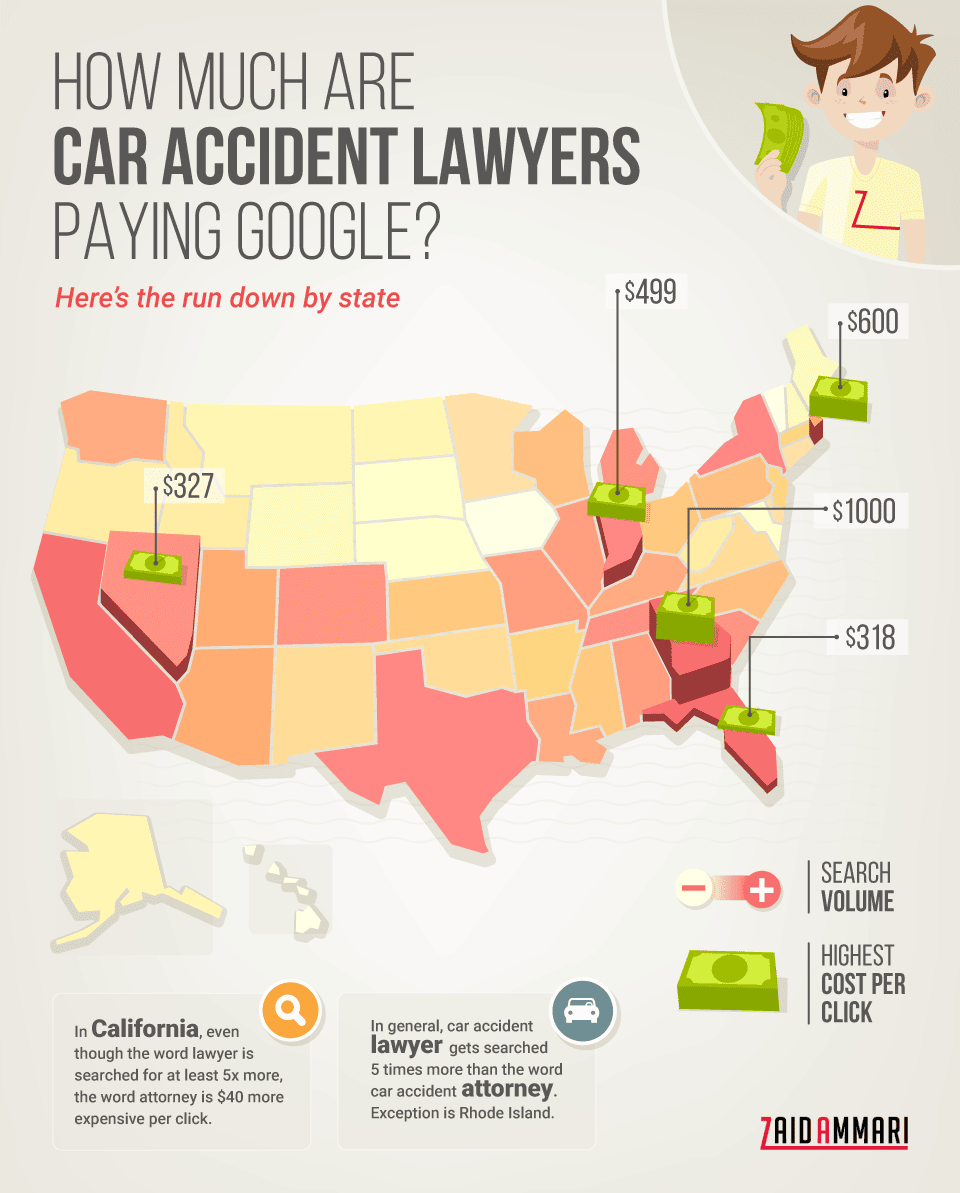
United States car accident lawyer CPC heatmap from PPC Masterminds
For the full breakdown of how those dollars translate into case value, plus the bid, budget, and intake moves that keep ROI positive, learn more in PPC Masterminds’ PPC for Lawyers guide.
Even a handful of mismatched LSAs can drain more budget than a week of well-screened search traffic.
Swap gross CPL for five outcome metrics
Cost per lead is blunt. A firm might pay $60 for a slip-and-fall caller it declines, while another pays $110 for a trucking-crash lead that signs the same day.
Track these five numbers instead:
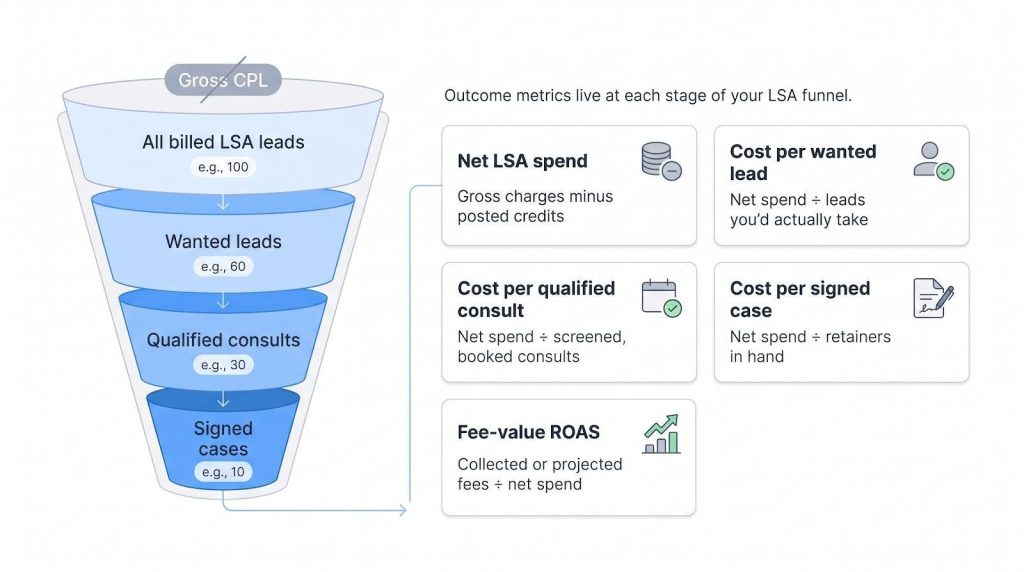
- Net LSA spend: gross charges minus posted credits
- Cost per wanted lead: net spend divided by leads the firm would consider taking
- Cost per qualified consult: net spend divided by screened, booked consults
- Cost per signed case: net spend divided by retainers in hand
- Fee-value ROAS: collected or projected fees divided by net spend
A $100 CPL can be fine if cost per signed case lands below $3,000 on matters worth $30,000. Reverse that ratio and it becomes a budget leak.
Layer in five intake ratios
Dollars alone miss bottlenecks. Pair the finance view with:
- Live-answer rate: calls a person answers before voicemail
- Wanted-lead rate: share of billed leads you would actually accept
- Consult-booking rate: wanted leads that schedule a meeting
- Show rate: booked consults that occur
- Signed-case rate: consults that turn into paid representations
A low answer rate inflates missed-call charges; a strong wanted-lead rate but weak show rate signals follow-up gaps. Review monthly to spot waste early.
Treat benchmarks as signposts, not verdicts
- Pareto Legal’s study of nine law firm accounts in 2025 put LSA cost per signed case at about $2,525, from $1,643 in bankruptcy to $4,188 in immigration.
- An estate-planning case study by Pronto Marketing cited 785 LSA leads but based its $1.1 million pipeline on projected revenue, not closed matters.
Before you compare, ask who gathered the data, what dates, which practice areas, whether credits were netted out, and how “lead” and “signed case” were defined. If your own cost per signed case sits below matter value and below peer ranges, stay the course. If not, fix targeting or intake, and resist chasing someone else’s headline number.
Prevent junk charges before the phone rings
Tighten categories and job types
Open the LSA dashboard first, not the dispute form. Uncheck any practice area you routinely refer out. If you handle catastrophic injury only, drop general personal injury; if you avoid DUI, remove it. Google will not credit wrong-practice calls, so stop inviting them. You can also deselect individual sub-services (for example, bike accident, dog bite) without losing truck accident. Granularity is your friend: the narrower the menu, the fewer mismatched callers reach your line.
Narrow service areas
Listing every ZIP code within a 50-mile radius signals Google that each one is fair game. Trim the map to courthouses you actually serve (think drive time, licensing limits, and client convenience). A smaller footprint means fewer wrong-county calls and tighter spend.
Make listed hours honest
Google charges by the hours you publish, not the hours your staff is present. If your Business Profile still says Open 24 hours but phones go dark at 6 p.m., every 20-second after-hours ring becomes a paid lead. Match GBP hours and the LSA ad schedule to real coverage, and close weekends if voicemail is the only option.
Build layered phone coverage
Real life, such as lunch breaks or court runs, creates gaps. Use a three-tier system:
- Primary intake answers the first ring.
- After three rings, overflow hits a ring group.
- Unanswered calls roll to a legal-trained answering service.
Redundancy cuts missed-call fees and lifts your responsiveness score.
Prepare for the Performance Max migration
Google is rolling LSAs into specialized Performance Max campaigns. Weekly budgets convert to daily averages, manual bidding disappears, and historical reports do not transfer. Export spend, lead, credit, and signed-case data now, and save call recordings offline. After migration, confirm that the new daily budget equals the old weekly spend divided by seven and that the routing number still points to live intake. A one-hour audit today can prevent a week of mystery charges tomorrow.
Use an intake script that protects both budget and prospects
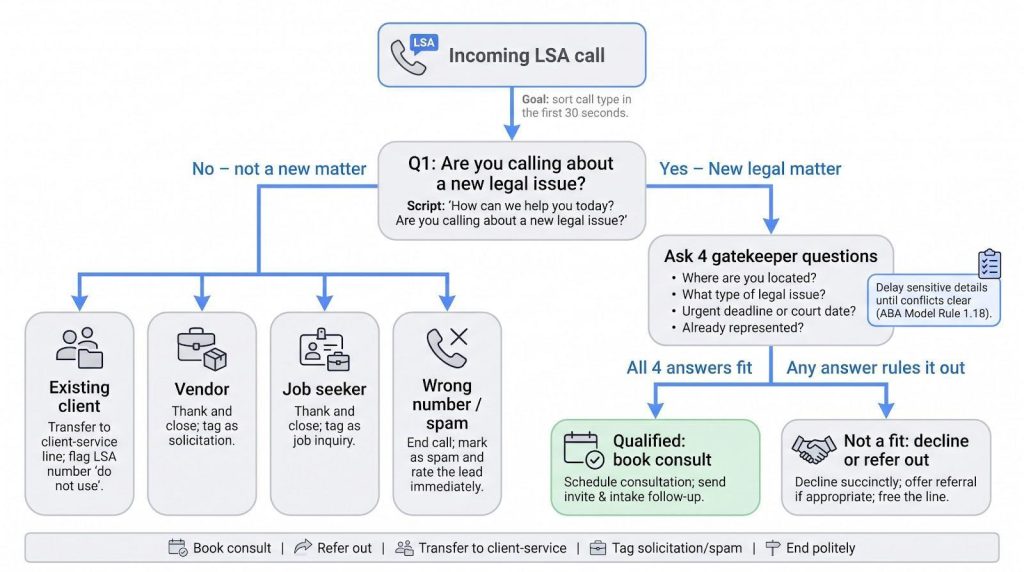
Identify the call type in the first 30 seconds
Train staff to sort each caller into five buckets: new legal matter, existing client, vendor, job seeker, or wrong number. Use a simple line: “How can we help you today? Are you calling about a new legal issue?” That question surfaces intent. If the caller is not a potential new matter, end politely and log the disposition; every extra minute cements the fee.
Ask four gatekeeper questions
Once the caller confirms a new matter, collect only:
- Where are you located?
- What type of legal issue prompted the call?
- Is there an urgent deadline or court date?
- Are you already represented?
If any answer rules the case out, decline courteously and free the line. If all four fit, move to conflict screening and deeper intake.
Delay sensitive details until conflicts clear
Under ABA Model Rule 1.18, even prospective clients deserve confidentiality. Stick to location, case type, and opposing parties on the first call; skip medical history or documents until you confirm no conflicts. Offer a secure follow-up once the matter appears viable.
End every call with a clear path
- Qualified: book the consultation and send a calendar invite
- Wrong practice: decline succinctly, offer a referral if appropriate
- Vendor/job seeker: thank and close, tag as solicitation
- Spam/silent: mark as spam and rate the lead immediately
- Existing client: transfer to the client-service line and flag the LSA number “do not use” in the contact card
Defined exits keep paid minutes focused on winnable work and uphold both budget discipline and ethical duties.
Audit every charged lead
Review leads the same day
Pull the LSA dashboard each afternoon. Listen to new recordings (where allowed) and compare them with your intake notes. Flag wrong-practice, wrong-area, vendor, and existing-client calls while memories are fresh, because same-day review turns frustration into usable data.
Keep a lead-evidence log
Use a shared sheet with these 15 fields:
- Lead ID
- Date or time
- Caller name
- Phone or email
- Call duration
- Listed category
- Caller’s actual need
- Caller city
- Lead type (new, existing, vendor, spam)
- Answer source (staff, service, voicemail)
- Charge status (charged, in review, credited)
- Feedback reason submitted
- Credit date or amount
- Consultation outcome
- Signed-case value
Update the row the day the lead arrives, and fill the credit column when Google posts the refund. Patterns such as three duplicate vendors credited or five wrong-practice calls denied become clear at month-end.
Reconcile weekly and monthly
Each week total charges, credits, and net spend. Cross-check lead IDs against your CRM, and confirm every consult and signed case traces back to a specific LSA record. At month-end recalculate the five financial metrics and five intake ratios covered earlier.
If credits shrink or wrong-practice calls spike, adjust categories, areas, or hours before filing a support ticket. Settings fixes beat email arguments almost every time.
Escalate patterns, not one-offs
Support rarely reverses a single denial; a documented pattern makes a stronger case. Gather at least ten similar lead IDs, plus timestamps, recordings, and current settings. Show the pattern, the financial impact, and the evidence in one concise email. Solid documentation gets attention; loose anecdotes earn apologies.