


You have a finished track and no budget for a film crew. An AI music video generator is the fastest way to turn that audio into something you can actually post. But the tools work in very different ways. Some are full AI music video generators that build a synced video for you. Some are audio-reactive video makers that move visuals to your beat. And a few are general editors where music is just one feature among many.
I ran the same finished track through five popular options: Renderforest, Specterr, Vizzy, Syqel, and Veed. The question was simple. Which one gets you from an audio file to a clean, shareable music video the fastest, without paying for a stack of tools you do not need?
Here is what I found.
AI Music Video Generators at a Glance
| Tool | Audio-Reactive | Template Library | Use Your Own Footage | Free Plan | Best Length | Starting Price |
| Renderforest | Yes, beat-synced | 128 music video templates | Backgrounds only | Yes, watermarked | About 1 min free | From about $6.99/mo |
| Specterr | Yes, beat-synced | Focused, music-only | Limited | Yes, watermarked | Up to 5 min | From about $16.50/mo |
| Vizzy | Yes, manual control | Small, editor-first | Yes | Yes, no watermark | Several min | Free, paid tier available |
| Syqel | Yes, real-time | 50,000+ visuals | Some | Yes | Long-form friendly | Free, paid plans available |
| Veed | Basic | General, not music-first | Yes | Yes, watermarked | Editor-length | From about $12/mo |
Pricing shifts often and varies by billing and region, so treat these as a starting point and check each site before you buy.
5 AI Music Video Generators, Reviewed
- Renderforest – The Best All-Around AI Music Video Generator
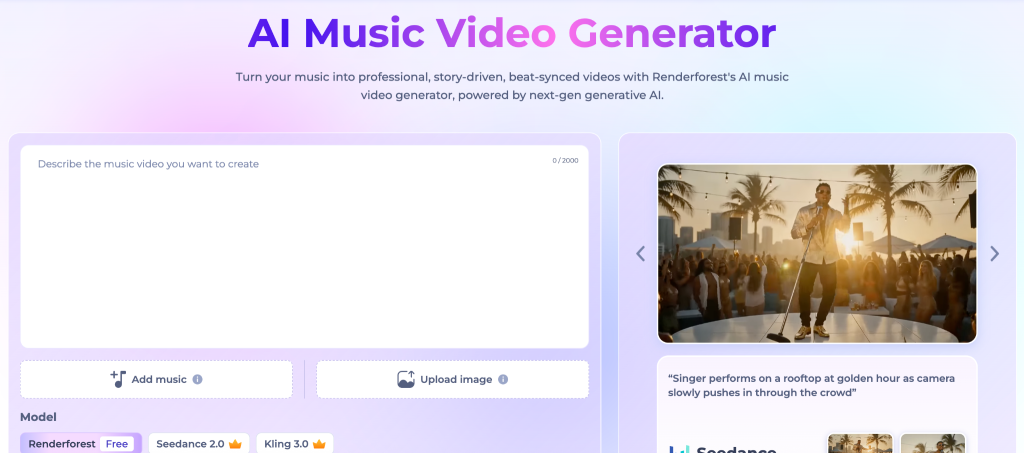
Renderforest was the tool that got me from a finished track to a polished, on-brand music video with the least friction, and it does more than one job. Renderforest is an all-in-one platform that also builds logos, intros, mockups, and even a simple website, so the same subscription covers most of the visual identity a music artist needs.
The music video generator itself is genuinely good. It reads the rhythm of your track and syncs the animation, and its text holders make it easy to keep your track title and artist name on screen for recall. You can drop in your album cover or a photo as the background to keep everything on brand.
Key features:
- 128 music video templates across different moods and genres
- Beat-synced animation with sound-responsive visuals
- Animated text holders for track title and artist name
- Custom backgrounds using your album art or photos
- Logo maker, intro maker, and channel art in the same account
Limitations:
- The free plan watermarks videos and caps length at about a minute
- The Lite plan limits monthly exports, which adds up if you publish often
- Audio duration support varies by template, so check before you commit to a look
Pricing: Free plan with watermark, paid plans from around $6.99 per month.
Best for: Artists and small labels who want a music video plus logo and channel branding in one affordable place.
- Specterr – Built Only for Music, and It Shows
Specterr is a dedicated music video maker, and that focus is its biggest strength. You upload a track, pick a template, adjust colors and shapes, and the visuals move with the beat. The live preview updates as you edit, so you are not rendering blind and waiting to see if it worked.
Key features:
- Beat-synced visuals with spectrum bars, waveforms, and particle effects
- Real-time editor with live preview
- Album art and logo drop-in for simple branding
- Export presets for YouTube, Reels, and TikTok
Limitations:
- The free plan adds a watermark and caps daily exports
- Paid plans sit on the higher end for a single-purpose tool
- Style range is solid but not huge, so heavy publishers will cycle through looks
Pricing: Free plan with watermark, paid plans from around $16.50 per month.
Best for: Musicians and producers who want a focused tool that does one job well and syncs to the beat without fuss.
- Vizzy – Free, Flexible, and Rewards Patience
Vizzy is a browser-based music video maker that stands out for one reason: you can export in high resolution without a watermark on the free plan. The trade is a steeper learning curve. Its Analyzers let you set exactly how each element reacts to the music, which gives you real control, but it takes time to learn.
Key features:
- High-resolution export with no watermark on the free tier
- Manual reactivity controls for precise beat response
- Cinematic effects like glitch, VHS, and fisheye
- Animated text, images, and layered scenes
Limitations:
- The editor is less beginner-friendly than the others here
- Works best in Chrome and Chromium browsers
- No large template library, so you build more from scratch
Pricing: Free with no watermark, with a paid tier for extra features.
Best for: Budget-conscious artists who want control over the final look and do not mind a longer setup.
- Syqel – Made for DJs and Live Sets
Syqel takes a different angle. It is an audio-responsive platform built for live performance as much as for finished videos. With a very large library of visuals and both browser and desktop access, it suits DJs and producers who want reactive visuals running in real time behind a set.
Key features:
- Real-time, audio-responsive visuals for live use
- Very large visual library to pull from
- Browser and desktop options
- Works for both recorded tracks and live audio
Limitations:
- The live-first focus is more than you need for a single lyric video
- Output can feel busy if you want something minimal
- Fewer clean template presets than the music-first tools
Pricing: Free tier, with paid plans for higher resolution and commercial use.
Best for: DJs, VJs, and electronic artists who want reactive visuals for live shows and streams.
- Veed – A Full Editor With a Music Video Tool Attached
Veed is a general online video editor that includes a music video tool. If you already want subtitles, trims, and layered edits, having it in the same editor is convenient. But music is not the center of the product, so the beat syncing is basic compared to the dedicated tools.
Key features:
- Full editing suite with captions, trimming, and layers
- Wrap visuals around your own footage
- Auto subtitles, useful for lyric-style videos
- Clean, beginner-friendly interface
Limitations:
- Beat reactivity is simple, not beat-aware in depth
- The free plan adds a watermark
- You are paying for a whole editor, not a focused music video tool
Pricing: Free plan with watermark, paid plans from around $12 per month.
Best for: Artists who want a music video plus real editing tools and captions in one workspace.
Which AI Music Video Generator Should You Pick?
After the same test on every tool, the picture is clear.
Most artists are not just making one video. They also need a logo, channel art, an intro, and a consistent look across platforms. That is why Renderforest is the best all-around pick here. You get a solid beat-synced music video generator plus the branding tools around it, all under one affordable subscription, so you are not stitching together three different apps to launch a single release.
The others still have their place. For a pure, beat-synced music video, Specterr is the most focused option and the easiest to get a clean result from. For a free result with full control, Vizzy wins, as long as you are willing to learn its editor. For live sets, Syqel is built for the job. And if you want a real video editor with a music video tool inside it, Veed makes sense.
The right tool depends on the job. If you are building a brand around your music and want one place to do it, go all-in-one. If you only ever need videos and want the cleanest beat sync, go focused.