


Midjourney still turns prompts into gallery-ready art, but each prompt chips away at your monthly spend. We stress-tested seven rival generators by producing 100 images at 1,024 × 1,024 pixels—then tallied cost, quality, licensing, and ease of use. The results surprised us: four tools cost nothing, one matched Midjourney’s cinematic flair for one-fifth the price, and another bundled bulletproof commercial rights into a Photoshop-native flow. Read on to discover which platform fits your style and budget so you can create freely instead of rationing credits.
How we calculated true cost per image

Before we pick a champion, you deserve to see the yardstick.
We pulled the cheapest public plan for every generator, counted the credits or minutes, and asked one question: how many 1,024-pixel images can a working designer make in a month?
We set the workload at 100 images, ambitious yet realistic for illustrators, marketers, and small studios that prompt daily.
We divided each subscription price by 100. Credit bundles got the same math. If a free tier met or exceeded the quota, the cost stayed at zero. When pricing varied by resolution, we used 1,024 × 1,024 pixels because most designers export at that size.
We ignored one-time promotions and referral perks so the figures stay repeatable with a new account and a standard credit card.
Quality, licensing, and ease still matter, but converting dollars to cents puts every service on equal footing.
What you’ll pay at a glance
Big promises turn murky fast, so let’s ground the numbers.

| Tool | Free allowance | Cheapest paid option | Cost for 100 images* | Quick read |
| Bing Image Creator | 15 fast generations per day, then unlimited slow | None | $0.00 | DALL-E 3 output, small Bing watermark |
| Stable Diffusion (self-host) | Unlimited on your own GPU | DreamStudio API ≈ $1 | $0.00–$1 | Full control, tech-savvy setup |
| Playground AI | About 80 images per day | Pro $15 per month (unlimited) | $0.00 | Friendly web interface, long free runway |
| Leonardo AI | 150 tokens daily | Apprentice $10 per month | $0.10 | Deep controls, custom models |
| Ideogram | Roughly 40 images per week | Plus $20 per month | $0.00–$0.20 | Reliable text-in-image output |
| Adobe Firefly | Around 25 images monthly | Credit pack $4.99 / 100 | $0.05 | IP-safe, Photoshop native |
| ChatGPT + DALL-E 3 | None (use Bing for free) | $20 per month | $0.20 | High-grade realism inside ChatGPT |
*Assumes a 100-image workload at 1,024 × 1,024 pixels.
Midjourney’s five-cent average is no longer the standout it once felt. Several rivals produce solid art for nothing, and even the costliest entry here equals a single coffee for a full month of image generation.
Next, we will explore each platform to see where the savings meet real-world creative needs.
Leonardo AI: best overall value
Leonardo feels like the Swiss Army knife of image generators. Open Leonardo’s web-based AI image generator for speed, consistency, and control, then drop in a prompt to receive studio-grade art in seconds with no Discord commands.
The free tier offers 150 fast tokens each day. That equals a few dozen high-res drafts before breakfast. Upgrade to the Apprentice plan at ten dollars per month and you unlock 8,500 tokens, enough for hundreds of portfolio-ready renders while still spending less than a movie ticket per week.
Control is the main draw. Leonardo also layers in power tools like Canvas repainting, Image-to-Image refinement, a universal upscaler, and its Phoenix foundational model; see the feature breakdown for the complete list so revisions and upscales happen in one tab instead of three. You can also train custom models with a handful of reference shots and reuse that style across a full comic or product line.
There are trade-offs. Free images are public, and the interface shows many levers that may overwhelm first-time users. Still, for creative power per penny, few tools compete.
Reach for Leonardo when you want Midjourney-level detail plus private, tweakable results without the Discord chatter.
DALL-E 3 and Bing Image Creator: free photorealism on tap
When you need lifelike faces or product mock-ups fast, OpenAI’s DALL-E 3 sets the pace. Inside ChatGPT Plus, the model follows detailed prompts almost word for word and returns four crisp options in under ten seconds.
The Plus plan costs twenty dollars per month, so our 100-image benchmark lands at twenty cents per file. It costs more than several rivals in this guide, yet it still beats many traditional stock sites.
Microsoft flips that math. Bing Image Creator runs the same DALL-E 3 engine in your browser for free. You receive about fifteen boosted prompts each day; once they run out, generation slows but never stops. The only catch is a small Bing watermark that disappears with a quick crop.
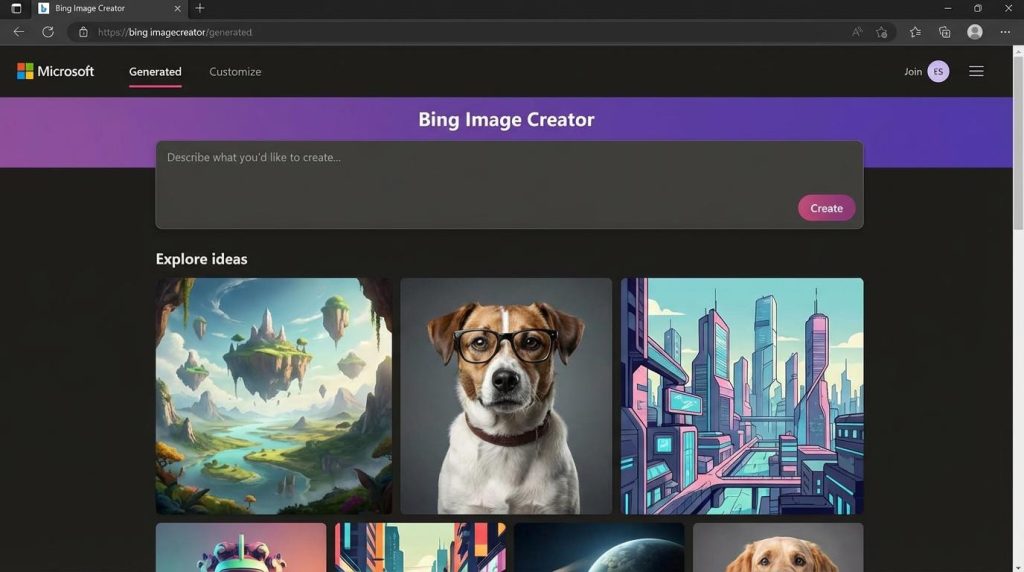
Bing Image Creator DALL-E 3 photorealism interface screenshot
Choose this duo when realism matters, budgets are tight, and you want results without a complex interface. ChatGPT Plus suits power users who value its chat features, while Bing serves as an always-available backup for client-ready renders.
Adobe Firefly: IP-safe images inside Photoshop
If you already work in Creative Cloud, Firefly feels like an upgrade you forgot to install. Open Photoshop, click Generative Fill, and seconds later the blank edge of your poster gains scenery that blends with the original layers.

Adobe Photoshop Generative Fill with Firefly workflow screenshot
The legal protection matches the visuals. Adobe trained Firefly only on licensed or public-domain material and backs enterprise users with indemnity against copyright claims. Your team can ship a campaign without worrying that a stock agency will appear in the inbox.
Cost stays predictable. A standard Photoshop plan includes about 2,000 generative credits each month, more than enough for our 100-image test. If you run out, a five-dollar credit pack buys another hundred images, bringing the cost to roughly five cents per file.
Firefly’s style skews clean and commercial, ideal for product hero shots, social ads, or layered composites. It will not match Midjourney’s moody fantasy look out of the box, but the direct hand-off to masks, blend modes, and smart objects often saves an hour of retouching per piece.
Choose Firefly when brand safety, team workflows, and final-mile polish matter more than raw experimentation.
Stable Diffusion: unlimited images if you roll up your sleeves
Stable Diffusion is the open-source engine behind much of today’s AI art. Run it on your own GPU and you will never see a credit meter; the only limits are hardware and imagination.
If your rig falls short, cloud hosts such as DreamStudio charge about one cent per render. That means our 100-image test costs roughly a dollar, a small price for full control over prompts, models, and extensions like ControlNet or LoRA.
The catch is effort. You will adjust checkpoints, negative prompts, and batch settings the way photographers tweak shutter speed. That tinkering unlocks surgical control that Midjourney and DALL-E keep under the hood.
Choose Stable Diffusion when you need a distinctive style across a full product line or comic series and you do not mind spending an afternoon learning the dashboard.
Playground AI: unlimited experiments with no up-front cost
Playground sits between code-heavy Stable Diffusion installs and locked-down premium apps.
Sign up and you get ten fresh generations every three hours. Keep the tab open and you can create more than two thousand draft images each month without spending a cent. Upgrade to the fifteen-dollar Pro plan only when queue times slow a deadline.
The interface prefers sliders to jargon. Pick a model preset, adjust style strength, and watch the canvas fill. A built-in editor lets you extend borders or erase objects without leaving the page, so ideation and revision stay in one loop.
Output quality depends on the model you choose, yet the newest SDXL presets rival Midjourney for scenery, fashion shoots, and concept art. Add ControlNet templates and you gain pose control once reserved for hardcore users.
Choose Playground when you need many drafts fast, want a clear web UI, and value freedom over proprietary styles.
Ideogram: when your image needs perfect typography
Midjourney and DALL-E often scramble letters, but Ideogram spells them out like a seasoned sign painter.

Ideogram AI perfect text-in-image typography screenshot
Type “Retro neon poster saying ‘OPEN LATE’ ” and the model returns clean, readable text baked into pixel-sharp artwork. That skill turns Ideogram into a handy choice for logo drafts, T-shirt mock-ups, and social memes.
The free tier offers about forty images each week, enough for prototypes or quick proofs. Upgrade to the twenty-dollar Plus plan and you unlock roughly one thousand renders every month, dropping our 100-image cost to two cents apiece.
Generation is steady, the interface stays simple, and every output carries commercial rights. The only catch is capacity: free credits reset weekly, so a large project might require a mid-month top-up.
Choose Ideogram whenever you need legible words inside AI art without opening Illustrator.
Which tool fits your project?
Think of these services as a paint palette. Each color suits a different task, so match them to the jobs you handle most.

If photorealism tops the brief, reach for Bing Image Creator or ChatGPT + DALL-E 3. They capture skin texture, product reflections, and architectural lighting with minimal prompt fuss.
Need a signature style you can reuse? Stable Diffusion is your sandbox. Train a model once, and every later prompt keeps the same visual language.
When budget rules and volume is high, Playground AI keeps ideas flowing all day without a credit squeeze.
For designers deep in Creative Cloud layers, Adobe Firefly brings AI power into familiar tools and adds reliable license protection.
Logo, label, or poster on the docket? Ideogram is the engine that spells words as clearly as you do.
Want Midjourney drama at a hobby price? Leonardo AI offers flexible, private output while driving per-image cost down to pennies.
Pick the tool that fixes today’s hurdle, then mix and match as your workload shifts. In 2026 you no longer have to choose one model for life; you can keep several in rotation.
FAQs from working creators
Can I sell images from these tools without legal headaches?
Yes. Every platform in this roundup grants you commercial rights to the pictures you create. Firefly even covers enterprise users with indemnity against copyright claims, while the open-source Stable Diffusion license lets independents monetize freely. Always review the latest terms before a big launch, but for day-to-day merchandise, you are covered.
Which service is best for a consistent character across multiple scenes?
If you need quick variations, Leonardo’s Character mode keeps facial features steady. For full control, train a small LoRA inside Stable Diffusion and reuse it across prompts. The other tools reset memory each time, so faces may shift.
Do I need a large GPU?
Only if you run Stable Diffusion on your own machine. Every other option operates in the cloud and works on a mid-range laptop or phone browser. Local SD needs at least 6 GB of VRAM for smooth 1,024-pixel renders.
Will any of these apps replace Photoshop?
They replace stock photo searches, not layer workflows. Firefly integrates most deeply, but many pros still jump into Photoshop or Affinity for precise masks, text alignment, and CMYK tweaks.
Is Midjourney still worth paying for?
If you like its cinematic glow and do not mind Discord, keep the subscription. Just remember that on cost per image, and for tasks such as type design or bullet-proof licensing, today’s alternatives often win.